

If you plan to work from your Tokyo apartment, check the desk and the internet before you book.
Check these things before you book
- Is Wi-Fi included and ready when you arrive? If you make frequent video calls or large uploads, ask for the connection details.
- Is the desk big enough for your laptop, keyboard and anything else you use?
- Ask for a photo of the chair, so you can see what you will sit on.
- Are there power sockets within reach of the desk?
- Can you work without glare from the window, and is there good light after dark?
- How quiet is the room during your working hours? This matters most if your team is in another time zone.
"High-speed Wi-Fi" does not tell you the speed you will get in the room. If you depend on the connection, ask for a recent speed test and prepare a backup, such as mobile data.
On your first day
Find the Wi-Fi name and password in the room instructions. Test your usual work apps and make a test call before your first important meeting. If the connection does not work, contact the apartment provider.
Set your screen at a comfortable height. A small laptop stand, a keyboard and a mouse are worth packing if you will work for several weeks. Keep cables out of walkways.
Where should you take calls?
Take calls in your apartment or in a workspace that allows them. A café is fine for reading or a short email session, but it is often too noisy for meetings. Keep your voice down during evening calls, and follow the building's quiet hours.
What else is useful nearby?
A supermarket, a convenient station and somewhere to take a short walk all help. You can work at home and go out for lunch and breaks.
Working from a LOHUS home
Wi-Fi is included in every LOHUS home. Many homes have a desk and chair, and each apartment page lists its workspace and equipment, so you can choose a room that suits the way you work. Tell us what you need when you enquire.
After check-in, the LOHUS Guest Guide for your room explains how to connect to the Wi-Fi and how to use each appliance. Open an appliance and tap a numbered marker on its photo to read what that button does, or choose Step by step for a guided sequence. The air-conditioner guide, for example, explains the cooling, heating and dry modes.
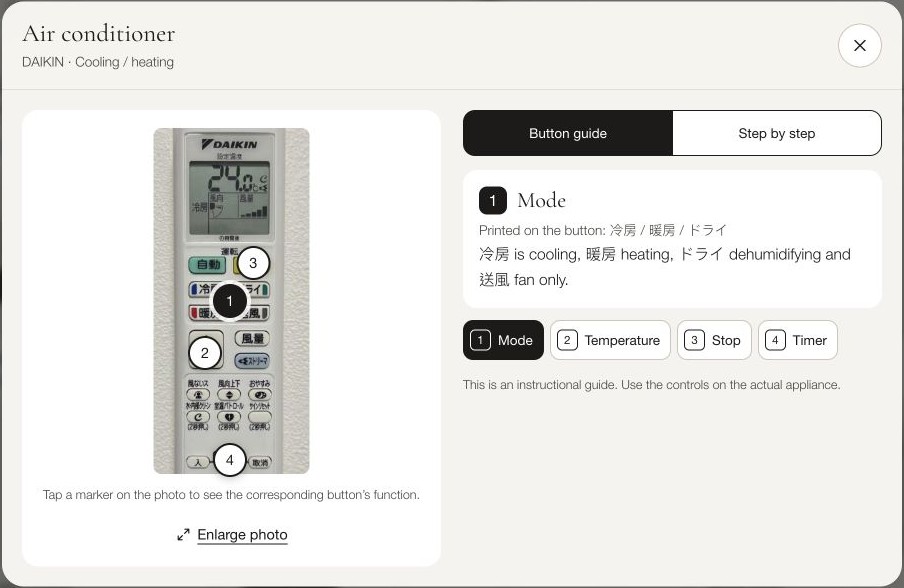
The appliance guide in the LOHUS Guest Guide. This example is from one of our homes; your equipment may differ.
For coffee and coworking close to our homes, see our guides to Nishi-Shinjuku, Otsuka and Hatsudai.

